
Guided Project Setup
Choose your institution, department and referencing style and get an outline to match. Edit it as much as you like before you start.

AI FINAL YEAR PROJECT GENERATOR
Generate your project chapter by chapter, with references checked against published sources and a Word document formatted for submission.
MEET YOUR WORKSPACE
Your chapters, cover page, reference list, files and research assistant, all in one place.

Trusted by students at
FEATURES
Choose your institution, department and referencing style and get an outline to match. Edit it as much as you like before you start.

Generate each chapter with proper sections and academic depth. Text is saved as it arrives, so a dropped connection does not cost you the draft.

Ask about your chapters, your files or your topic. It finds published sources and suggests edits, and you decide what goes in.

Every change keeps the previous text. Go back to any earlier version of a chapter whenever you need to.
HOW IT WORKS
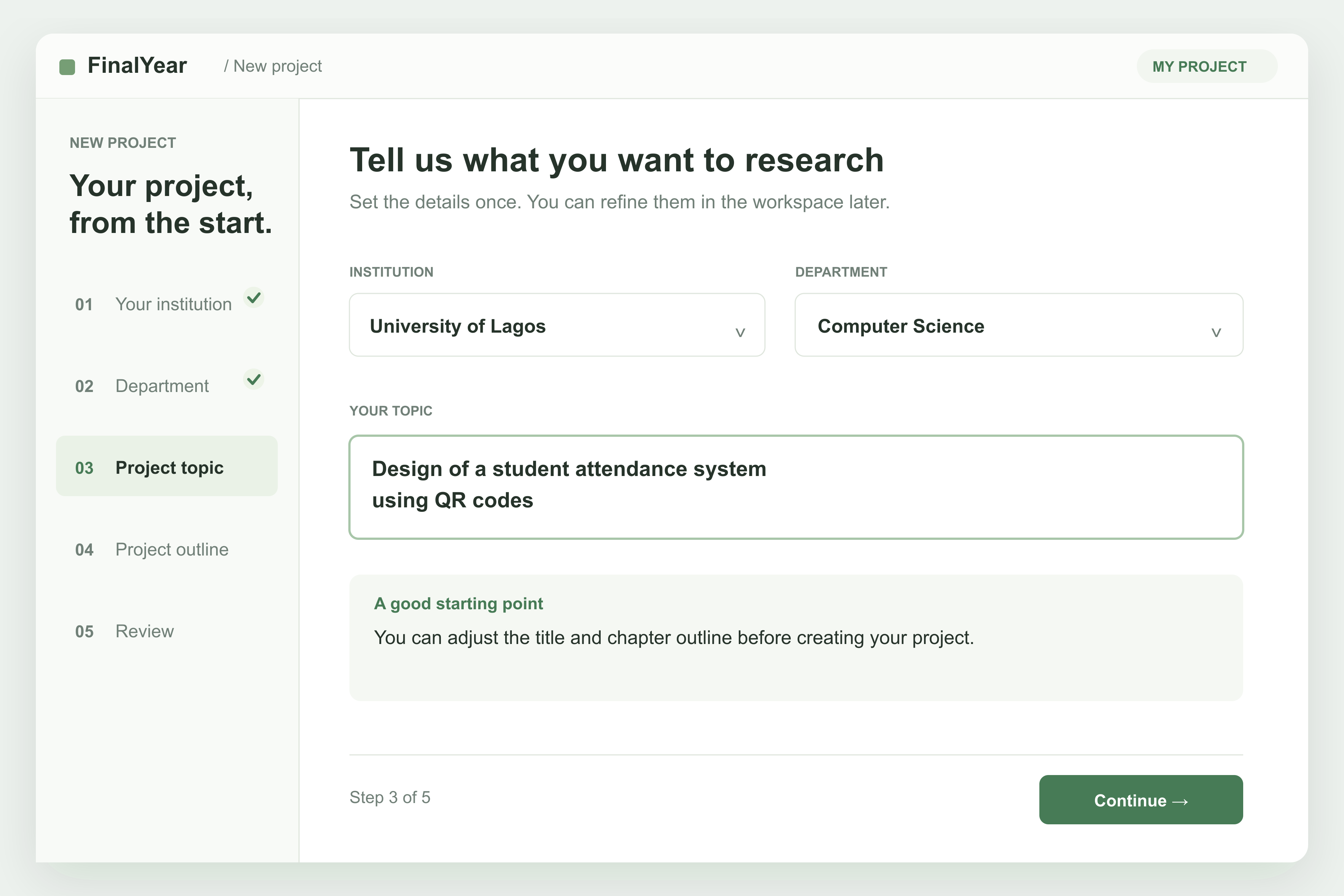
Choose your institution and department, settle your topic and referencing style, and adjust the outline until it matches what your department expects.
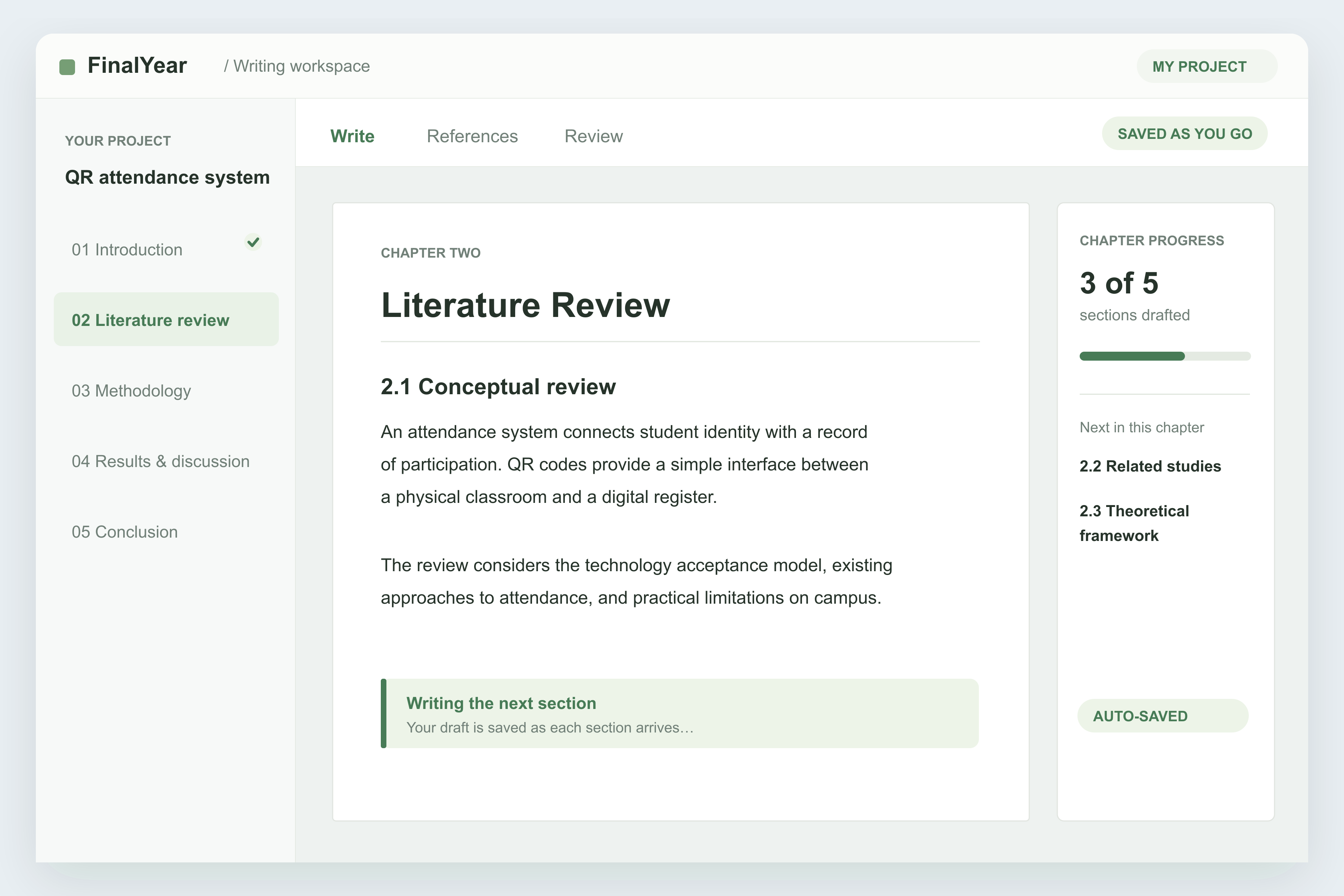
Chapters are written one at a time and saved as they arrive. If your connection drops, resume or keep the partial draft.
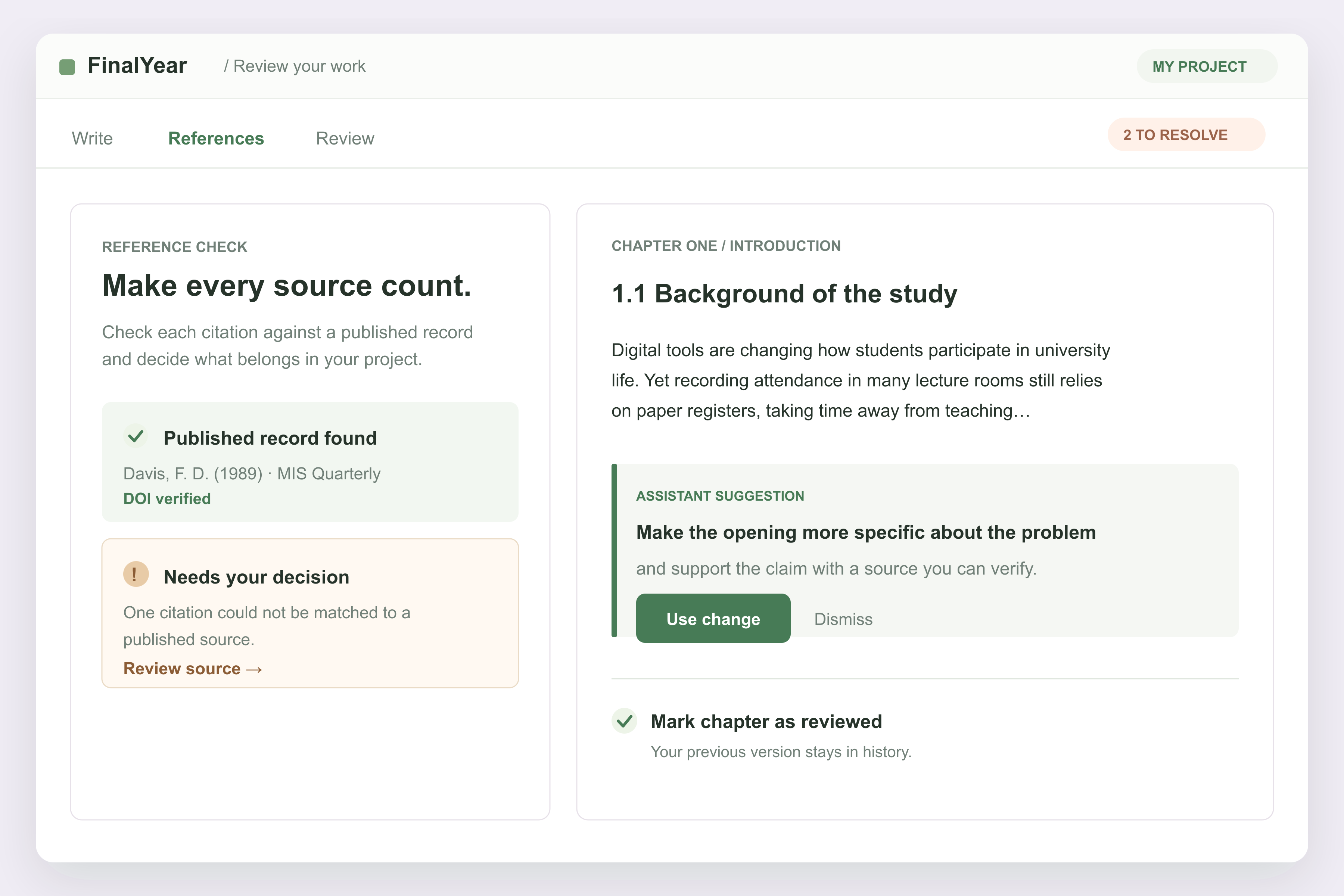
Work through reference issues one by one, use or turn down the assistant’s suggestions, and mark each chapter reviewed when you are satisfied.
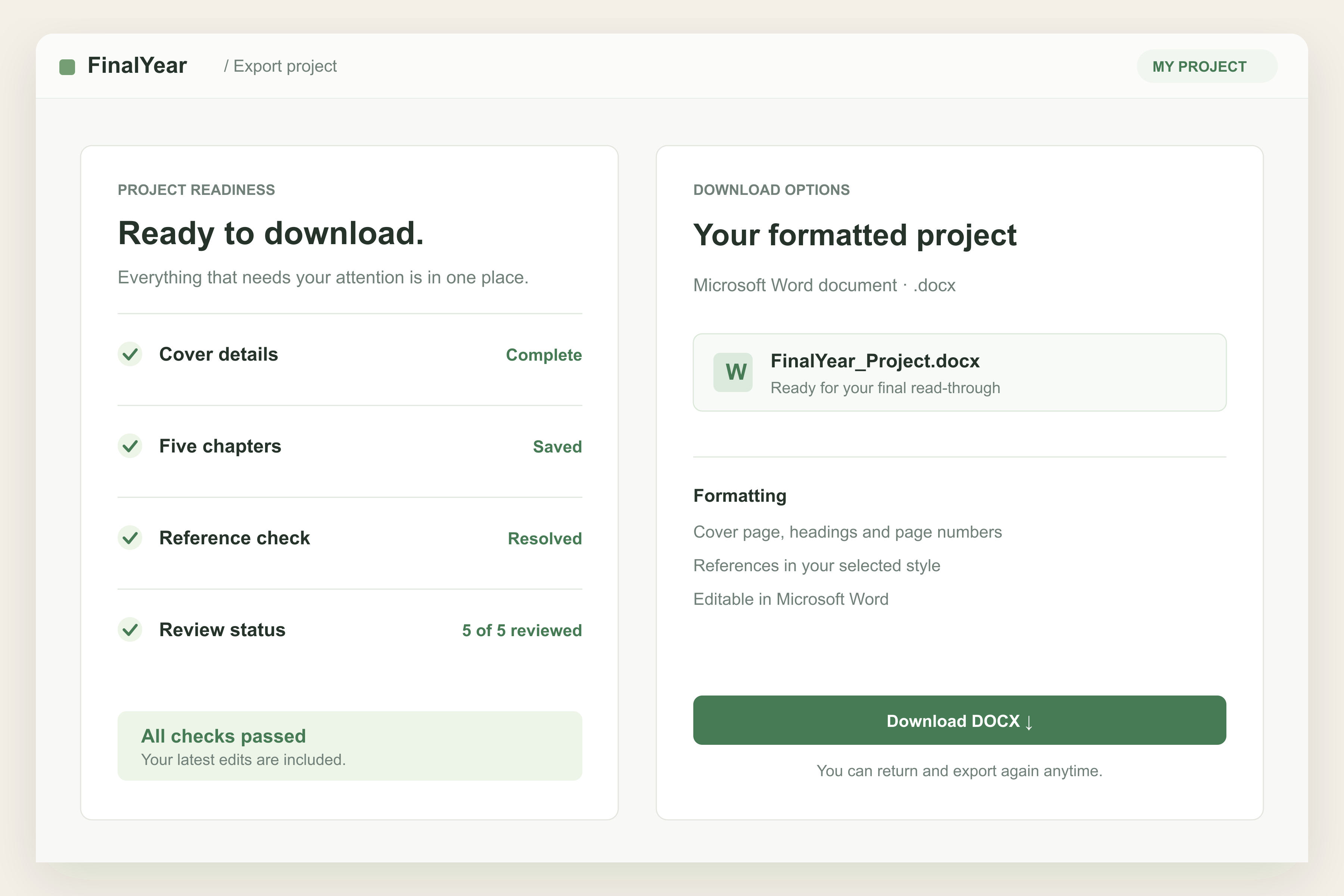
A readiness check flags missing cover details and unresolved references. Then download your formatted Word document.
REFERENCES YOU CAN CHECK
Citations are picked up from your own text and matched against Crossref, the record of published research. If a source has no matching record, it says so. If a claim needs a source, you see a clear marker instead of an invented one.

YOUR PROJECT, YOUR DECISIONS
The research assistant never writes into your chapter. Every edit arrives as a proposal, shown paragraph by paragraph, for you to use or turn down.

READY TO SUBMIT
Export a DOCX with your cover page, chapters, figures, tables and reference list. Set the font, size, line spacing, margins and page numbers your department asks for.

BRING YOUR OWN MATERIALS
Add PDFs, Word documents and images to your project. The text is read when you upload, so the research assistant can work from your materials.

ALSO INCLUDED
Choose from more than 300 institutions and 170 departments and start with an outline that fits your department and project type.
Get topic ideas for your department, or sharpen the topic you already have.
Rename, reorder, add or remove chapters. There is no chapter limit.
Watch your cover page take shape as you enter your name, matric number and supervisor.
Headings, lists, tables, block quotes, code blocks and figures, right in the chapter.
If your network drops while a chapter is being written, resume it or keep the partial draft.
Say what should change in your own words and get a revised chapter.
The assistant looks up statistics, policy and news and gives you the real links.
Find a published source and insert the citation at the exact sentence that needs it.
Switch the whole project between styles, and revert if you change your mind.
Insert uploaded images as figures. They are embedded in your DOCX along with your tables.
Sections are renumbered for you as 1.1, 1.2, 1.2.1 when you export.
FIND YOUR PROJECT TOPIC
Start with an idea, choose your department, and find a topic that interests you.
THE GUIDE
A final year project is the longest thing most students ever write, and the part that stalls people is rarely the thinking. It is the blank page, the chapter structure nobody explains, and references that have to be real. This guide covers what a final year project maker can and cannot do for you, and how to use one without handing over your own work.
A project generator turns a topic into a working draft. A good one does four things: it gives you a chapter outline that matches your department, it writes each chapter in academic English, it attaches citations you can check, and it hands you a Word document formatted the way your school wants it bound. What it should never do is invent a source, or change your writing without telling you.
Final Year is built around that last point. The draft is a starting position, not a finished project. You read it, correct it, add your own data and your supervisor's direction, and the tool keeps every earlier version so nothing you wrote is ever lost.
Most Nigerian undergraduate projects follow the same five-chapter shape. Your department may number the sections differently, or ask for a sixth chapter, and the outline can be changed to match.
The preliminary pages — cover page, certification, dedication, acknowledgements, abstract and table of contents — sit in front of Chapter One. Final Year prints your cover page from the details you enter, and your reference list at the back in your chosen style.
A topic that can be finished in one semester is usually narrow in three ways: a clear subject, a named population or setting, and a method you can actually carry out. “The effect of social media on students” is a subject, not a topic. “Social media use and reading habits among year two students of a named university” is a topic, because you know who you would survey and what you would measure.
If you do not have one yet, type a rough idea into the box at the top of this page and you will get topic suggestions for your department, or open the topic finder and browse starting points department by department.
What makes a good topic differs by field: a Computer Science project is usually built and tested, an Economics project is usually argued from data, and a Nursing Science project is usually measured in a named ward or clinic. The topic finder on this page suggests final year project topics for your own department, and you can take any suggestion and narrow it further before you start.
The fastest way to fail a defence is a reference nobody can find. General-purpose AI tools are known for producing citations that look correct and do not exist, because they are written from patterns rather than looked up.
Final Year treats sources separately from writing. Citations found in your text are matched against Crossref, the register of published research. A source that matches carries a DOI you can open and check. A source that does not match is marked unresolved, and a statement that needs support is flagged in plain words instead of being given a made-up reference. You can search published literature and insert a citation at the exact sentence that needs it, and switch the whole project between APA 7th, Harvard and Chicago whenever your supervisor asks.
Most departments ask for Times New Roman 12 pt, 1.5 or double line spacing, justified text, and a wider left margin so the pages survive binding. Those are the defaults here, and each can be changed before you download. Section numbering is handled for you, so renaming or reordering a chapter does not leave you fixing numbers by hand. Tables and figures are carried into the Word document with your text, and a readiness check tells you about missing cover details or unresolved references before you download.
Your project is meant to show that you can ask a question, gather evidence and argue from it. A generator can carry the structure and the drafting; it cannot collect your data, sit your defence or answer for your judgement. Use it to get past the blank page, then make the work yours: check every source, replace borrowed framing with your own, put your real findings in Chapter Four, and read the whole thing aloud before you submit. Your institution's rules on AI assistance apply to you, so read them first.
A final year project generator is a tool that turns your project topic into a full draft: chapter by chapter, with the sections your department expects, citations in your referencing style, and a Word document you can submit. Final Year writes each chapter on your instruction, shows you the sources behind it, and leaves every edit in your hands.
Yes. The setup starts from a list of more than 300 Nigerian institutions and 170 departments, and the outline you get follows the chapter structure Nigerian departments ask for, from Chapter One through to your references. The cover page prints your matric number, supervisor and department the way a Nigerian project is bound.
Yes. Chapter One is usually background of the study, statement of the problem, objectives, research questions, significance and scope. You choose the chapter, say anything it should take into account, and the draft is written into the editor where you can rewrite any passage.
It writes any chapter you open, one at a time, including chapters beyond five if your outline has them. Writing them one by one is deliberate: each chapter should follow from the one before it, and you should read and correct each one before moving on.
Citations are matched against Crossref, the record of published research, and a verified source carries a DOI you can open. If a source cannot be matched, it is marked unresolved rather than left to look real, and a claim that needs a source is marked plainly instead of being given an invented one.
APA 7th, Harvard and Chicago author-date. You can switch the whole project from one to another at any time, and switch back if your supervisor changes their mind.
Yes. Upload PDFs, Word documents or photographs of handwritten notes. The text is read when you upload, and the research assistant can work from it when it writes or checks a chapter.
No. Chapters are written from your topic, your outline, your research question and your uploaded materials, so two students with different topics get different projects.
Treat it the way you would treat a research assistant: it drafts, finds sources and suggests edits, and you decide what stays. Nothing is submitted for you, every change is yours to accept or reject, and your institution's rules on AI assistance still apply. Read your department's policy before you submit.
That is the point. The editor is a full writing surface with headings, lists, tables, figures and block quotes. Highlight any passage to rewrite, clarify or shorten it, and every version is kept so you can go back.
No. The research assistant never writes into a chapter directly. Every edit arrives as a proposal, shown paragraph by paragraph against what you have, and nothing changes unless you accept it.
A Word document (.docx) with your cover page, chapters, figures, tables and reference list, in your font, size, line spacing and margins, with a wider binding margin if your department requires one. Section numbers are renumbered for you as 1.1, 1.2, 1.2.1.
Yes. The default is Times New Roman 12 pt, 1.5 line spacing, justified, with a 1.5 inch left margin for binding, which is what most Nigerian departments ask for. Change any of it before you download.
Yes. Type a rough idea and you get topic suggestions for your department, and you can sharpen a topic you already have before you start.
The outline is built from your project type and department, so it fits a polytechnic project, a degree project or a longer dissertation. You can rename, reorder, add or remove chapters until it matches what you were given.
You can plan the whole project — course, topic and outline — before creating an account. An account is needed at the point the project is created, so it can be saved and written.
Yes. Many students write their own methodology and use the assistant for the literature review, or write everything and use it only to check references. Your own typing is never charged.
The chapter is saved as it arrives. When you come back you can resume the run or keep the part that was already written, so a dropped connection does not cost you the draft.
Yes. Setup, the editor, the research assistant and export all work on a phone, which matters when campus internet is easier to reach on data than on a laptop.
A chapter is usually written in a few minutes, and appears as it is written rather than all at once. A full project is normally the work of a few sittings, because you should read, correct and add your own findings as you go.